Product Company Support Download Purchase Blog Reviews
   
  Download Eval Now
divider
 
OfficeWriter API for Excel and Word
OfficeWriter and SharePoint
OfficeWriter for Reporting Services
 
Purchase OfficeWriter
OfficeWriter Demos

 
Download a FREE Executive Summary Report created with OfficeWriter and AdventureWorks!


OfficeWriter for SQL Server Reporting Services (SSRS)

OfficeWriter integrates with and extends SQL Server Reporting Services to offer enhanced Excel and Word rendering, support for more file formats, and an Office-based report design tool.
 

Features:

divider
arrow

Enhanced Excel Reports:

Deliver reports from SSRS that support all Excel features, including real Excel charts, pivot tables, formulas, and macros.With OfficeWriter, the Excel or Word document you build as a template is the report definition. So, you’re guaranteed to have it render exactly as it looks during design-time.
(Read more about OfficeWriter for SQL Server Reporting Services integration).
divider
arrow

XLSX and DOCX files in SSRS 2005/2008/2008 R2/2012:

Add OpenXML file format export to any released version of SSRS.
divider
arrow

SSRS 2008 R2 supports XLSX files:

With XLSX export, you can get around the 65k row limitation present in the XLS file format and the current SSRS Excel renderer.
divider
arrow

Default SSRS 2012:

Now supports XLSX/DOCX too
- Adding OOXML / XLSX in 2005 – 2008 R2
- Live formulas, charts, full features <-- SSRS XLSX format still has images for charts and pre-computed formulas
divider
arrow

CopySheet extended to copy between workbooks in ExcelWriter:

Combine all of your worksheets into one master workbook, while saving hundreds of lines of code.
divider
arrow

Ability to use MergeFields in headers and footers in WordWriter:

We’ve expanded the current SetMailMerge feature to support merge fields in the headers and footers of DOCX template files.


Office-Based Report Design

divider
OfficeWriter for Reporting Services includes a lightweight Office plug-in that allows you to build reports using Excel and Word as the design tool.
arrow

Build, edit, publish, and preview reports from Office:

The OfficeWriter designer plug-in lets you build queries, edit existing RDL files, define parameters and expressions, and bind data – all within Office.
divider
arrow

Leverage your existing investment in Office:

Existing Excel or Word documents with data connections or VBA code for importing data can easily be retrofitted to a Reporting Services report. Once it’s published, it can take advantage of all the server features of Reporting Services including scheduling, delivery, caching, and security.
divider
arrow

Use design tools your information workers already know:

All report design is done in Excel and Word. So, information workers can build XLS/XLSX and DOC/DOCX reports using tools they are already familiar with.
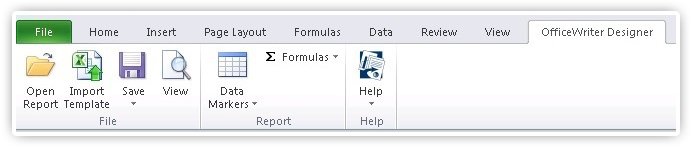
Build reports using Excel and Word with OfficeWriter's Designer Toolbar